What is metasyn?
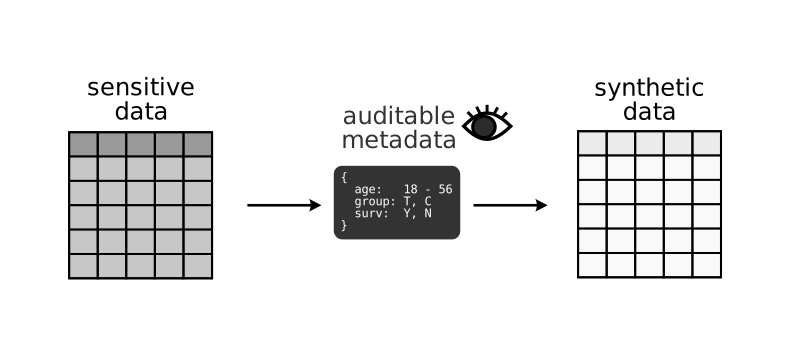
Metasyn is a python package for generating synthetic data with a focus on maintaining privacy. It is aimed at owners of sensitive datasets such as public organisations, research groups, and individual researchers who want to improve the accessibility, reproducibility and reusability of their data. The goal of metasyn is to make it easy for data owners to share the structure and approximation of the content of their data with others with fewer privacy concerns.
Use cases
Below are a few possible use cases for metasyn:
A researcher who cannot share their dataset because of privacy concerns, but shares a synthetic version for reproducibility.
A data provider wants to show a preview of their sensitive data using synthetic versions of their datasets.
A developer can create synthetic data before they have real data so they can write and test data analysis scripts.
Metasyn is specifically not designed for creating highly accurate synthetic data, where all relationships between columns are reproduced.
Key features
Easy: Creating your first synthetic dataset shouldn’t take more than 15 minutes with our quickstart.
Fast: Creating synthetic data takes mere seconds for medium sized (~1000 rows) datasets.
Safe and Understandable Synthetic Data: As little information as possible is retained from the original dataset, and you can inspect and understand exactly which information is used to create your synthetic data.
Flexible: You can adjust the synthetic data columns to your liking, create your own distributions, plugins and more.
Data Type Support: Metasyn supports generating synthetic data for a variety of common data types including
categorical,string,integer,float,date,time,datetime, and ``duration’’.Integration with Faker: Metasyn integrates with the faker package, a Python library for generating fake data such as names and emails. Allowing for more realistic synthetic data.
Structured String Detection: Metasyn identifies structured strings within your dataset, which can include formatted text, codes, identifiers, or any string that follows a specific pattern.
Handling Unique Values: Metasyn can identify and process variables with unique values or keys in the data, preserving their uniqueness in the synthetic dataset.
Multiple table support: Metasyn supports the synthesis of multiple tables at the same time. Primary/foreign key relations can be preserved so that the synthetic tables can be joined correctly.
How does metasyn work?
Metasyn generates synthetic data by fitting models to each column independently based on the column’s data type, then it uses those models to generate new synthetic data.
It starts with a tidy dataframe, meaning each column has the correct data type (categorical, numeric, datetime, etc.), and missing data represented as missing values. Next, metasyn models each column independently, which is known as marginal independence. For each column, metasyn considers multiple candidate distributions based on the column’s data type and optionally with additional privacy constraints.
Data type |
Candidate distributions |
|---|---|
Categorical |
Categorical, Constant |
Continuous |
Uniform, Normal, LogNormal, TruncatedNormal, Exponential, Constant |
Discrete |
Poisson, Uniform, Normal, TruncatedNormal, Categorical, Constant |
String |
Regex, Categorical, Faker, FreeText, Constant |
Date/time |
Uniform, Constant |
After fitting all candidate distributions to the data, it selects the best-fitting one using a BIC (or pseudo-BIC when not applicable).
Once the MetaFrame is created, metasyn generates synthetic data by randomly sampling values from the fitted distribution. Finally, you can save your MetaFrame to a file as a JSON file.
For more detail on how metasyn works, see our paper.
Additionally, metasyn supports generation of synthetic data across related tables. The above process is applied to each table independently, and the relationships between tables can be preserved through defining primary and foreign key information (subset, equal, or equal ordered). After synthesizing the tables, the primary column is used to (re)generate the foreign column according to the specified relationship.
A detailed explanation of how multiple table generation works can be found here.
MetaFrames and GMF files
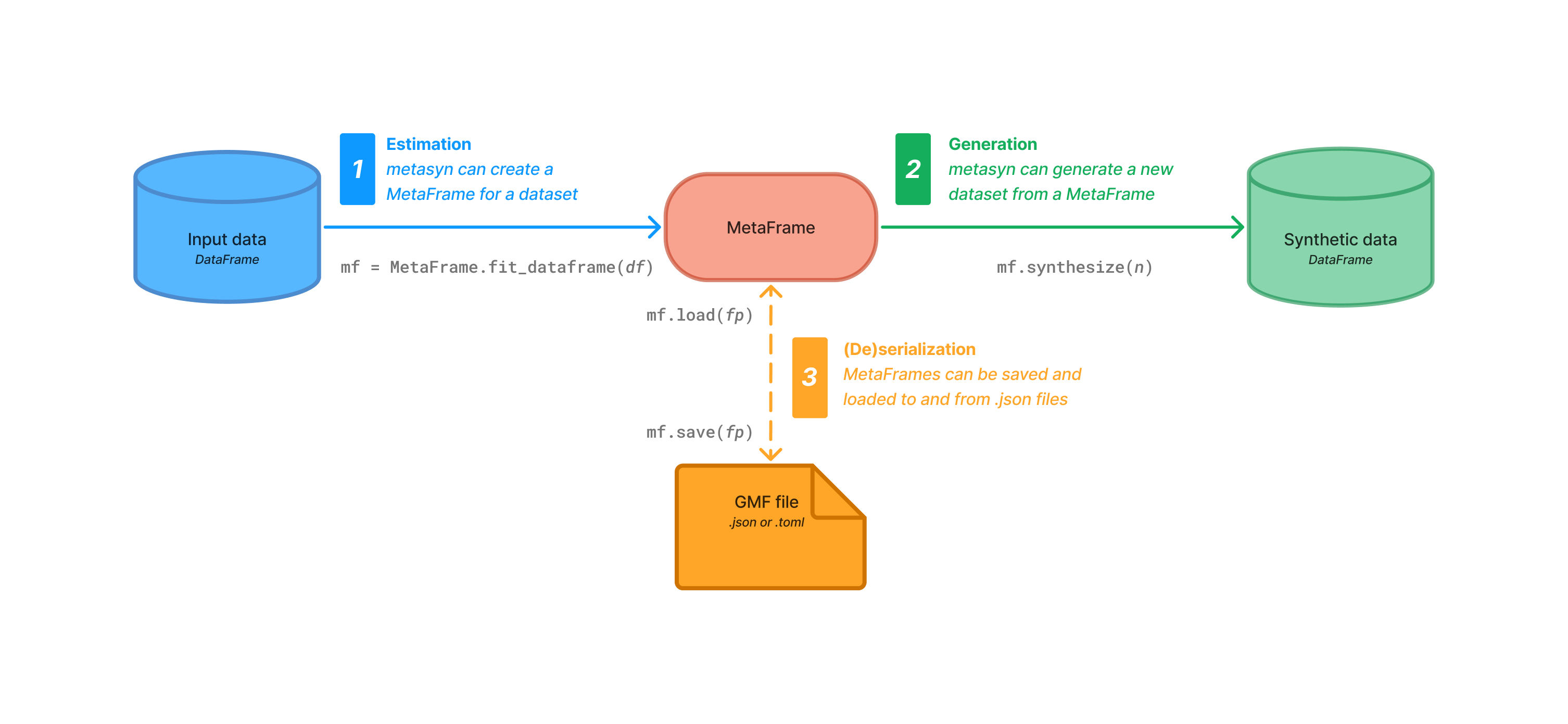
One of the main distinguishing features of metasyn is the ability to save the model for
your dataset in a standardized, human understandable and machine readable format: the Generative
Metadata Format (GMF). The equivalent object in Python is the metasyn.metaframe.MetaFrame.
The GMF format can be stored as a .json file (default).
An example of a GMF file [click to expand]:
{
  "gmf_version": "1.1",
  "n_rows": 5,
  "n_columns": 5,
  "provenance": {
      "created by": {
          "name": "metasyn",
          "version": "1.1.1.dev34+g59e65a26b.d20251010"
      },
      "creation time": "2025-10-10T10:53:38.821661"
  },
  "vars": [
      {
          "name": "ID",
          "type": "discrete",
          "dtype": "Int64",
          "prop_missing": 0.0,
          "distribution": {
              "name": "core.unique_key",
              "version": "1.0",
              "class_name": "UniqueKeyDistribution",
              "unique": true,
              "parameters": {
                  "lower": 1,
                  "consecutive": true
              }
          },
          "creation_method": {
              "created_by": "metasyn",
              "unique": true
          }
      },
      {
          "name": "fruits",
          "type": "categorical",
          "dtype": "Categorical",
          "prop_missing": 0.0,
          "distribution": {
              "name": "core.multinoulli",
              "version": "1.0",
              "class_name": "MultinoulliDistribution",
              "unique": false,
              "parameters": {
                  "labels": [
                      "apple",
                      "banana"
                  ],
                  "probs": [
                      0.4,
                      0.6
                  ]
              }
          },
          "creation_method": {
              "created_by": "metasyn"
          }
      },
      {
          "name": "B",
          "type": "discrete",
          "dtype": "Int64",
          "prop_missing": 0.0,
          "distribution": {
              "name": "core.uniform",
              "version": "1.0",
              "class_name": "DiscreteUniformDistribution",
              "unique": false,
              "parameters": {
                  "lower": 1,
                  "upper": 6
              }
          },
          "creation_method": {
              "created_by": "metasyn",
              "unique": false
          }
      },
      {
          "name": "cars",
          "type": "categorical",
          "dtype": "Categorical",
          "prop_missing": 0.0,
          "distribution": {
              "name": "core.multinoulli",
              "version": "1.0",
              "class_name": "MultinoulliDistribution",
              "unique": false,
              "parameters": {
                  "labels": [
                      "audi",
                      "beetle"
                  ],
                  "probs": [
                      0.2,
                      0.8
                  ]
              }
          },
          "creation_method": {
              "created_by": "metasyn"
          }
      },
      {
          "name": "optional",
          "type": "discrete",
          "dtype": "Int64",
          "prop_missing": 0.2,
          "distribution": {
              "name": "core.uniform",
              "version": "1.0",
              "class_name": "DiscreteUniformDistribution",
              "unique": false,
              "parameters": {
                  "lower": -30,
                  "upper": 301
              }
          },
          "creation_method": {
              "created_by": "metasyn"
          }
      }
  ]
}